1Recognise and control the location mode
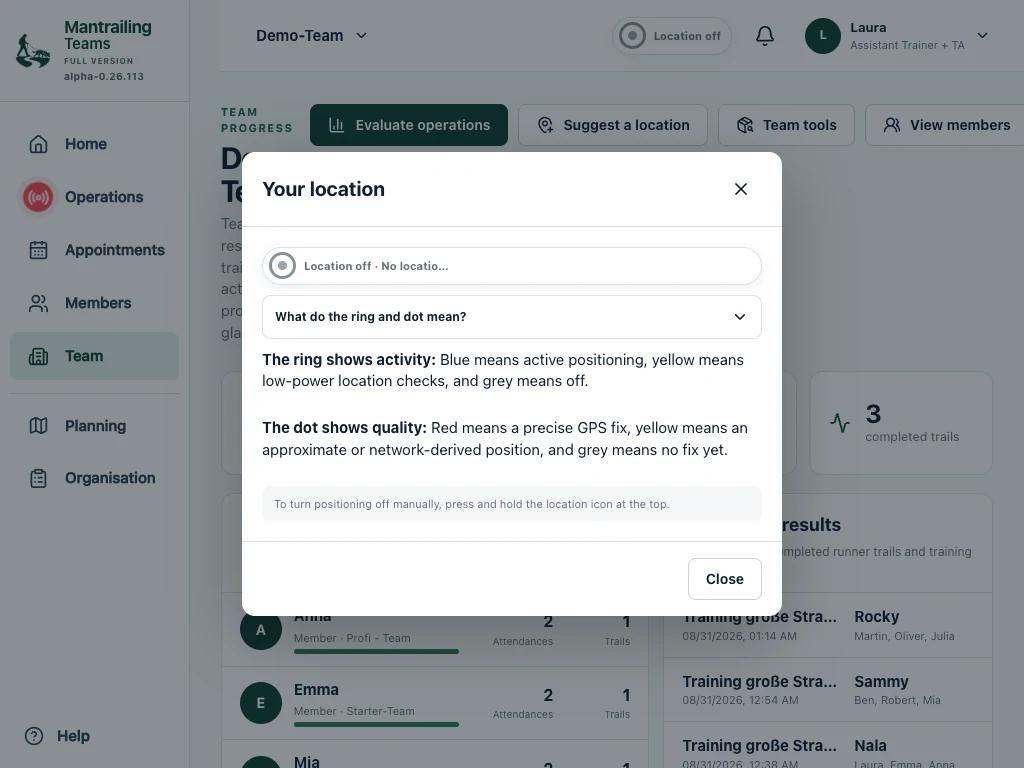
The location indicator distinguishes location off, sparse and precise. Tap it for information. Press and hold to reach the switch-off confirmation. For a called assignment, the app may remind you that location is off.
Device permission and the app’s switch are separate. Granting permission does not mean a trail is recorded continuously. Switching location off keeps previously saved data; it is not a delete function.
2Around an appointment: sparse checks
On iPhone and Android, the installed app checks for a suitable nearby appointment while open. The time window starts one hour before the appointment and ends two hours after it finishes. Without a relevant appointment, these automatic checks do not start.
Within this window, the app initially requests a low-power position. Regular checks occur about every five minutes. Opening or returning to the app can trigger an additional check.
Within two kilometres of the location, sparse mode applies when you are not assigned to an active operation. This is not continuous search-trail recording and does not keep a continuous background location service running. The initial check can happen outside the area to determine your distance.
3During an active operation: precise position and recording
An active assignment in the relevant time window and within two kilometres can trigger precise location collection. With the necessary permissions, this can continue on a phone with its screen locked.
A running recording saves position points with time and accuracy. The device can also provide altitude, direction and speed. It aims for frequent updates as you move, from about two metres and no more often than once a second; reception, device behaviour and power-saving affect the actual points.
The recording status determines whether your path is recorded. An enabled position display alone is not a started trail. Pause, completion and the operation phase therefore need to be considered separately from the location indicator.
4What are positions used for?
Existing sufficiently accurate positions can also be sent to the team service during an active operation to recognise accompanying people. Sparse mode therefore does not mean that a position is never transmitted.
Deliberate actions such as My position, following your position on the map or Suggest location can request location too. The selected place is submitted as a location suggestion only after confirmation. Normal browser views can also read the device position while such a function is used.
- Your own position and orientation on the map.
- Recording the agreed hidden-person or search trail and evaluating it later.
- Operation status and permitted team positions.
- Supporting arrival, find and companion recognition where the conditions are met.
5When does precise location collection stop?
Automatic precise phone location is tied to an active operation, its appointment window and the surrounding area. When the relevant assignment ends or you leave the area, it stops or switches to the appropriate state. Sparse checks can continue around the appointment.
Your device first has to receive a remotely ended operation’s new status. A broken connection can delay this. Check the visible state and switch location off yourself if necessary.
Taking a photo or briefly switching apps should not end a running recording. Background recording in a normal browser is less reliable than in the installed phone app.
6Who can see my information?
Location and operation data support your team’s functions. Visibility depends on membership, assignment and permissions. Not every member automatically sees every trail. Blind, Double Blind and private settings limit access.
Linking your own accounts does not automatically give another team access to your training data. An explicitly shared link, export, confirmed transfer or monitor presentation can make information accessible beyond the original group. Check these choices carefully.
7Maps, weather and notifications
We do not sell your personal data or share it for third-party advertising or profiling. Training data serves your chosen functions and authorised team.
Technically necessary services such as Mapbox, OpenStreetMap map services, address search, weather, email and push notifications may receive the information needed for the request, including connection data or coordinates. The privacy notice identifies the services involved.
8Your data and your rights
We use data sparingly and for specific purposes. You can request access, correction or deletion and withdraw consent for the future.
The website provides “Delete account” without login or an installed app. Your request is confirmed; deletion follows after checking your authorisation. Legally required retention is taken into account. Switching to the basic version alone does not delete data.
Use the contact form for further questions. The privacy notice is linked below.
These tablet screenshots show Demo-Team and its Berlin trails. The booking view shows upgrading from the base to the full version.